

AI Automation in May 2026: How Small Teams Turn Agents and Workflows Into Their Operating Model
Published: 18 May 2026 By: Kersai Research Team
Category: AI Strategy / Automation / Small Business Growth
Quick Summary
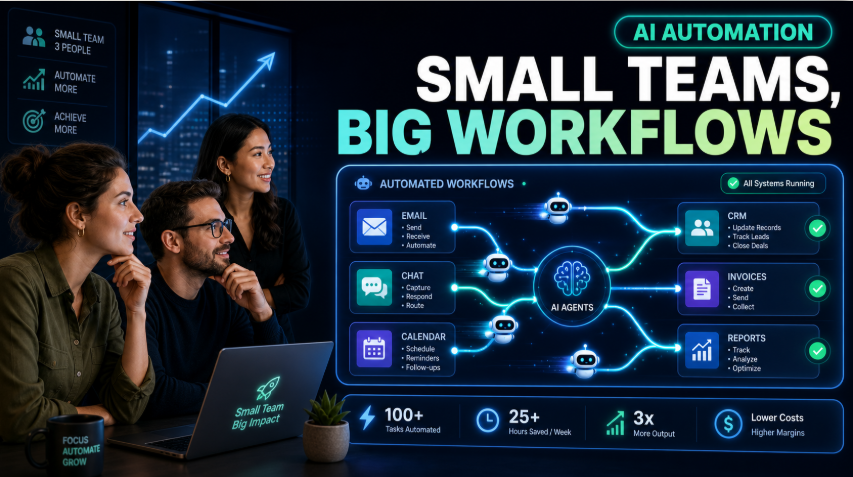
In 2024, most small teams thought “AI = chatbot.” In May 2026, that idea is already outdated. The real story now is AI automation: agents and workflows quietly running large parts of the business in the background.
The small businesses and startups pulling ahead are not the ones with the fanciest agents. They are the ones that use AI and automation as an operating model to respond to leads in minutes instead of hours, schedule and reschedule without effort, handle five times more customer volume with the same headcount, and keep admin from swallowing the week.
This guide explains what has actually changed in 2026, which workflows small teams are automating successfully, how the new “agent management” work shows up, and how to build a simple 6090 day automation operating model for your own business.
1. What’s Actually Changed in AI Automation by May 2026
Most mainstream advice still frames AI as a chatbot that replies when you ask it something. That is no longer the main game.
Recent automation frameworks and webinars all make the same point: in 2026, AI agents are becoming workflow engines.
- They detect work (an inbound lead, a new email, a status change).
- They initiate actions (ask a few questions, update CRM, create tasks).
- They complete multi‑step tasks (follow‑ups, reminders, escalations) without waiting for someone to tell them what to do next.
At the same time:
- Real‑world “autonomous” agents still handle a tiny slice of total work on their own; human‑in‑the‑loop + structured automation is where the results are.
- The biggest wins for small teams are coming from boring, repeatable workflows, not sci‑fi use cases.
So the mental model needs to shift from “we added a bot” to “we now run parts of the business as automated workflows, with AI doing the heavy lifting and humans doing the judgment.”
2. The 2026 Automation Stack for Small Teams (Plain English)
You don’t need a deep technical background to understand how modern AI automation works. For most small businesses, the stack looks like this:
- Triggers
- Events that start the workflow: new form fill, new email, new booking, status change, payment received.
- Workflows and tools
- Low‑code tools like Make, Zapier, n8n or industry‑specific platforms connect apps and define the steps.
- AI models and agents
- AI steps generate or interpret text, extract data, decide routing, or create summaries inside the workflow.
- Human checkpoints
- Humans approve drafts, handle exceptions, override edge cases, and refine the system.
Old “Chatbot” View vs 2026 “Workflow Engine” View
| Aspect | Old view (202324) | 2026 view |
|---|---|---|
| What AI is | A chatbot that answers when asked | A workflow engine that detects, routes and completes tasks |
| Where it lives | On the website or in a single app | Across tools (CRM, inbox, calendar, helpdesk, finance) |
| Trigger | Human asks a question | Events: new lead, new ticket, new payment, new message |
| Human role | Ask and hope it responds well | Design workflows, set rules, review outputs, improve system |
| Main value | Novelty and occasional time saving | Consistent time saving, faster response, higher throughput |
Once you see AI as part of a workflow engine, you start asking better questions:
- What should this system notice automatically?
- What decisions can it safely make?
- Where should a human step in?
- What should be logged and measured?
3. “What Actually Works” Workflows for Small Teams in 2026
There is now good convergence between practitioner write‑ups, small business guides and Reddit threads about what actually sticks for small teams.
The patterns that keep showing up:
3.1 Lead response and qualification
- The problem: Lead response takes hours or days and follow‑ups are inconsistent.
- The automation:
- AI responds to new inquiries within minutes (email, web forms, DMs).
- Asks 23 qualifying questions.
- Captures key details (budget, timeline, use case).
- Logs everything into CRM and assigns priority.
Benefit: consistent first touch, better data, fewer leads slipping through the cracks.
3.2 Scheduling and coordination
- The problem: Back‑and‑forth scheduling, reminders, no‑shows and rescheduling chew up hours every week.
- The automation:
- AI handles appointment booking, sends confirmation and reminders, manages rescheduling, and triggers follow‑ups for no‑shows.
Benefit: calendar utilisation improves, fewer no‑shows, less context switching.
3.3 Customer support triage and drafts
- The problem: Repetitive “where’s my order?” or “how do I…?” questions dominate inboxes and ticket queues.
- The automation:
- AI detects support intent, suggests FAQs or self‑serve links, drafts replies, and escalates complex cases to humans with full context.
Benefit: humans spend more time on high‑value or complex issues.
3.4 Back‑office: invoices, reconciliations and basic reporting
- The problem: Invoicing, reconciliations and simple reports get delayed because they are tedious and manual.
- The automation:
- AI extracts invoice details, populates accounting software, flags mismatches, and drafts recurring reports with commentary.
Benefit: cleaner books, fewer surprises, faster decision‑making.
3.5 Internal updates and summaries
- The problem: No one has time to read entire email threads, Slack channels or long documents.
- The automation:
- AI produces daily/weekly summaries, extracts action items, and creates tasks in your project tool.
Benefit: team stays aligned with less meeting time.
AI Automation Workflows That Work for Small Teams
| Area | What AI + automation do | What humans still do | Why it works |
|---|---|---|---|
| Lead response | Reply instantly, ask 23 questions, log to CRM | Have actual sales conversations, close deals | Faster response, better data, more throughput |
| Scheduling | Handle bookings, reminders, rescheduling, no‑shows | Deliver the service | Frees up admin time, reduces friction |
| Support | Triage, suggest FAQs, draft replies | Approve replies, handle complex cases | Shrinks repetitive workload, keeps quality |
| Finance | Extract invoice data, draft reports, flag issues | Decide and act on financial insights | Reduces manual data entry and delays |
| Internal updates | Summarise threads, calls, docs, create tasks | Prioritise and execute work | Cuts noise, keeps team aligned |
Notice the pattern: AI does the repetitive, structured parts. Humans do the judgment, nuance and relationships.
4. The New Work Around the Work: Managing AI Agents and Automations
As soon as workflows become more automated, new work shows up: deciding what to automate, monitoring what’s running, fixing what breaks, and improving the system.
A widely shared article on emerging AI‑agent roles breaks this into several “lanes”:
- Deployment & integration plugging agents into real systems and data.
- Business automation mapping workflows and building automations across tools.
- Reliability & operations (AI Ops) making sure agents don’t go offline, misbehave or blow up costs.
- Behaviour & safety defining what agents are allowed to do, monitoring output quality.
- Evaluation & improvement measuring performance, doing A/B tests, refining prompts and workflows.
In a small team, you don’t hire five separate people. But you do need to be clear who owns these responsibilities, even if they live in one or two roles.
For example:
- In a 510 person business, this might be the founder plus a technically inclined ops/marketing person.
- In a 2050 person business, you might formalise something like “Ops + AI lead” or “Automation owner”.
The key is to stop treating automations as side projects nobody owns. They are becoming part of how work gets done, so they need an owner.
5. Trust and Governance: The Biggest Automation Trend Nobody Markets
In automation communities, one of the most upvoted ideas is that the biggest trend in 2026 isn’t agents, it’s trust.
Enterprise automation reports say the same in more polite language: the conversation has shifted from “efficiency at any cost” to “efficiency under control”.
For small teams, governance doesn’t mean big‑company bureaucracy. It can be simple and still powerful.
A minimal governance model for small teams
You can cover a lot of ground with four questions:
- What is allowed?
- Which workflows can be fully automated?
- Where must a human approve before an action (e.g., sending money, changing pricing, sending mass emails)?
- What is logged?
- Are AI actions and key decisions logged somewhere you can review (e.g., internal channel, log dashboard)?
- Who can change automations?
- Which people can edit or deploy workflows?
- Is there a simple review step for changes that affect customers or money?
- How do we roll back?
- If something goes wrong, how do you pause or disable an automation quickly?
- How do you correct errors (e.g., resend accurate info, adjust records)?
Answering these up front turns AI automation from a risk into a controlled advantage.
6. A 6090 Day “Automation Operating Model” Plan
Instead of “play with tools and see what happens,” treat the next 6090 days as your operating model sprint.
Days 130: Audit and choose your battles
- List every repetitive workflow that annoys you or your team: lead response, reminders, support, reporting, invoicing.
- Estimate volume and pain: how many times per week, how much time, how much revenue impact.
- Pick 23 workflows where:
- volume is high,
- steps are structured,
- errors are low‑risk or easy to fix.
Also:
- Decide who will be your automation owner (even if it’s you).
- Decide which core tool you will use (e.g., Make, Zapier, n8n, or a vertical platform).
Days 3160: Design and build 12 flagship automations
For each chosen workflow:
- Map the current steps on one page: trigger → steps → decisions → outcomes.
- Decide which steps should be:
- fully automated,
- AI‑assisted (drafts/suggestions),
- human‑only.
- Build a first version using the simplest tool that can handle it. Avoid over‑engineering.
- Add metrics: time saved per week, response time, error rate, show‑up rate, etc.
- Run it for 24 weeks and collect feedback (team + customers).
Days 6190: Standardise, document and extend
At the end of 6090 days:
- Keep what works. Tighten rules, prompt templates and human checkpoints.
- Document it as “the way we now run this process,” not just a cool experiment.
- Assign ongoing ownership and a simple check‑in cadence (e.g., review every month).
- Decide whether to automate one or two additional workflows using the same pattern.
By the end of 90 days, you want:
- 13 workflows that are reliably automated.
- A clear sense of who owns automation.
- A lightweight governance and measurement habit.
That is what “AI automation as an operating model” looks like at small scale.
7. How Kersai Helps Turn AI Tools Into a Real Operating Model
Most small teams do not struggle for lack of AI tools. They struggle to:
- Choose which workflows to automate first.
- Design automations that actually match how the business works.
- Keep everything under control as complexity grows.
Kersai focuses on that translation.
Typical work includes:
- Identifying the highest‑leverage workflows for your specific model (leads, support, delivery, finance).
- Designing automation and agent workflows that respect your data, tools and team capacity.
- Setting up a simple, sustainable governance model for small teams.
- Helping you build internal capability so you aren’t dependent on agencies for every change.
The goal is not to give you more tools. It is to help you run a leaner, more responsive business where automation and AI actually feel like part of the operating system, not just a layer of noise.
Frequently Asked Questions
Do I need “AI agents” or is basic automation enough?
You don’t need fancy branding. Many of the best wins come from simple automations plus a few AI steps (summaries, drafts, classifications). You can call them agents if you like, but the value is in the workflow, not the label.
How many workflows should a small team automate first?
Start with one or two. Pick the ones with high volume and clear structure, like lead response + scheduling, or support triage + FAQs. Once those are stable, you can add more.
Which tool should I use: Make, Zapier, n8n or something else?
- Zapier great for very simple integrations and quick wins.
- Make excellent balance of visual workflows and AI model integration.
- n8n more technical, higher ceiling for complex/agentic workflows.
Choose based on your team’s comfort level and the complexity you actually need.
How do I avoid making a mess with automations?
Use the simple governance questions: what’s allowed, what’s logged, who can change workflows, how to roll back. Start with low‑risk areas and add human approval where money, compliance or reputation are on the line.
How do I know if my AI automation is working?
You should be able to point to numbers: reduced response times, fewer manual hours, more leads touched, fewer no‑shows, faster reporting. If you can’t see concrete improvements, either the workflow or the metrics need adjusting.
This article was researched and written by the Kersai Research Team. Kersai helps organisations design practical AI infrastructure strategies, from model selection and compute planning to multi‑cloud deployments and governance visit kersai.com.