

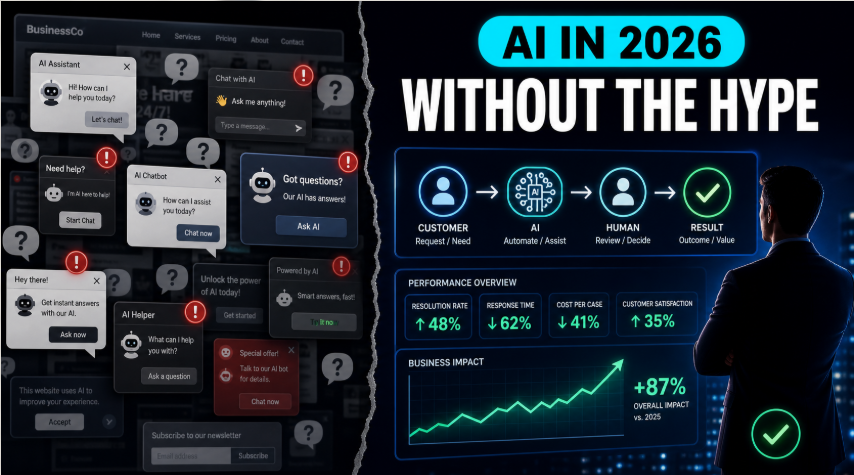
AI in 2026 Without the Hype: What Actually Works, What Annoys Everyone, and How to Use It Properly in Your Business
Published: 14 May 2026 By: Kersai Research Team
Category: AI Strategy / Customer Experience / Agentic AI
Quick Summary
In May 2026, AI is everywhere. Every site seems to have a chatbot, every product claims to be “agentic,” and every week brings a new “craziest AI update ever.” At the same time, real users on Reddit and social media are increasingly frustrated with hype, intrusive bots and tools that do not deliver.
This guide cuts through the noise. It explains what actually works in production right now, what is annoying your customers and teams, and how to use AI properly in your business so it creates trust and value instead of fatigue.
1. The Mood in May 2026: People Are Done With AI Hype
If you want to understand where AI really sits in 2026, Reddit and similar communities are a good truth serum.
A widely shared analysis of AI‑agent discussions summarises the sentiment this way:
- The conversation has split into lanes: skeptical builders, operators sharing what survives production, cost‑watchers, and infra‑focused developers.
- The focus is shifting from “autonomous employee fantasy” to constrained systems that can be measured, governed and trusted.
- The threads that resonate are not about AGI timelines. They are about reliability, cost, failure modes and real workflows.
At the same time, casual subreddits are full of posts like:
“Every single website in 2026 has a chatbot that pops up the second you land on the page and none of them have ever helped a single human being.”
In other words:
- People still want AI that helps.
- They are increasingly intolerant of AI that wastes time, hides content or pretends to be smarter than it is.
For business owners and executives, this is both a warning and an opportunity.
2. What Actually Works in Production (According to Real Users)
Under all the hype, certain AI patterns are quietly working well in real businesses.
2.1 The agent and workflow patterns that keep showing up
From Reddit builders, operator write‑ups and practitioner posts, you see the same “boring but durable” patterns emerge:
- Support triage and drafting
- Classifying incoming tickets, routing them to the right queue, drafting suggested replies for agents to review.
- Works because the workflow is bounded, repetitive and easy to measure.
- Email‑to‑CRM and admin cleanup
- Extracting key details from inbound emails and logging them into CRM or ticketing tools.
- Reduces manual copy‑paste and data entry errors.
- Meeting and call summaries
- Summarising sales calls, support calls or internal meetings into action items and short recaps.
- Helps teams stay aligned without everyone reading long transcripts.
- Content drafting with human editing
- Drafting internal docs, knowledge base articles and first versions of marketing copy.
- Humans still handle nuance, brand and final sign‑off.
- Internal knowledge retrieval
- Answering “where do I find X?” or “what is the policy on Y?” from internal docs, wikis and playbooks.
- Works well when content is structured and kept up to date.
Table: AI Workflows That Quietly Work in 2026
| Area | What AI does | What humans keep doing | Why it works |
|---|---|---|---|
| Support | Triage tickets, draft replies | Approve replies, handle complex cases | Clear boundaries, easy metrics |
| Sales/CRM | Extract data from emails, update records | Build relationships, close deals | Reduces admin, low risk |
| Meetings | Summarise calls, highlight actions | Decide priorities, follow through | Saves time, improves clarity |
| Content | Draft internal docs, KB, first drafts | Edit, approve, ensure brand voice | AI does heavy lifting, humans polish |
| Internal knowledge | Answer “where is / what is” questions | Own content quality and updates | Fast answers, lower interruption cost |
In almost every case, the pattern is the same:
- AI moves first and fast.
- Humans supervise, decide and own the outcome.
That mix is where value and trust tend to show up together.
3. How AI Is Annoying Your Customers (And How to Fix It)
The “every website has a chatbot that pops up instantly” complaint has become a meme because it reflects a real UX problem.
3.1 What people hate about most AI chatbots
Common grievances from current threads and essays include:
- Instant popups that block content before the visitor can even see if the page is relevant.
- Bots that cannot answer basic questions, then bounce visitors into generic links.
- No clear handoff to a human when the bot is stuck.
- Bots pretending to be human, which triggers a trust breakdown when users realise they are not.
- Repetition: every site using the same “Hi there! How can I help you today?” pattern.
The result is that many users reflexively close or ignore chatbots and associate them with friction, not help.
3.2 Principles for helpful AI on your website
You do not have to abandon chatbots or AI on your site. You need to use them in a way that respects your visitors.
Practical principles:
- Delay the popup
- Let users scroll or interact first. Trigger the bot based on intent (e.g., time on page, exit intent, searching for something).
- Make the bot context‑aware
- Use page context, search queries and referrers to shape the first question or suggested prompts.
- Always provide a clear “talk to a human” path
- Make it obvious when and how a user can reach a real person (chat, call, email, callback).
- Be upfront that it is AI
- Name it honestly. Users are more forgiving when they know what they are dealing with.
- Limit what the bot attempts
- Keep it focused on 35 useful jobs (FAQs, order status, booking, simple troubleshooting). Do those jobs well instead of pretending it can do everything.
A simple rule: if your AI interaction would annoy you as a user, it will probably annoy your customers too.
4. AI Trust in 2026: From Compliance Box‑Ticking to Business Capability
As AI systems, especially agents, take on more autonomy and start making recommendations or triggering actions, the consequences of failure grow.
Recent trust‑focused research shows:
- Organisations are moving beyond experiments toward scaled deployment of generative and agentic AI across core functions.
- Only about 30% have mature strategy, governance and agent controls; most are still catching up.
- Investment in responsible AI (RAI) practices strongly correlates with realised value.
- Companies that treat AI trust as a core business capability, not a compliance afterthought, are the ones best positioned to scale.
In practice, this means:
- Knowing which AI systems (and agents) are running, where, and on what data.
- Having clear policies for what they are allowed to do and what they are not.
- Monitoring performance, cost and incidents over time.
- Being able to explain and adjust how systems behave when context or requirements change.
For customers and employees, trust is becoming a competitive differentiator, not a “nice to have.”
5. A Simple “No‑Hype AI” Checklist for Your Business
This checklist helps you quickly assess whether your AI is helping or hurting.
5.1 On your website
- Does any AI or chatbot block content or appear before visitors can orient themselves?
- Can the AI answer the top 10 real questions your customers ask, using current information?
- Is there a clear path to a human from every AI interaction?
- Do you tell users clearly when they are talking to AI?
5.2 In customer support
- Are agents using AI to triage and draft, with humans still approving and handling edge cases?
- Do you track resolution time, CSAT and re‑open rates before and after AI?
- Do support agents feel that AI helps them, or that it just adds noise and extra steps?
5.3 In internal operations
- Are people using AI to summarise information and create tasks, or are they copy‑pasting everything manually?
- Are there documented workflows showing where AI sits, and where humans decide?
- Is there a simple policy on what data can be fed into external AI tools?
5.4 Governance and trust
- Do you know which AI tools and agents are in use across the business?
- Is there a named owner for each important AI workflow or system?
- Do you review AI performance and incidents on a regular cadence?
- Can you explain to a customer or regulator how your key AI systems behave and why?
If you cannot answer “yes” to most of these, you do not need more AI. You need better implementation and oversight.
6. Where to Focus Your Next AI Efforts (Without Adding More Noise)
When everything claims to be revolutionary, it helps to get back to basics.
6.1 Focus on workflows, not features
Instead of asking “Should we use AI agents?” ask:
- Which specific workflows are slow, manual, expensive or error‑prone?
- Where would faster responses, fewer errors or better insights make a real difference?
- Where can AI take on repetitive tasks while humans handle nuance and judgment?
Start with 23 workflows, not 20 disconnected experiments.
6.2 Start small but design like you will scale
Even small pilots should be designed with:
- Clear success metrics (time saved, cost per ticket, revenue per rep, error rate).
- Clear boundaries (what the AI can and cannot do).
- Logging and basic monitoring (so issues are visible).
- An owner who can improve or shut it down.
This is how you avoid “lab experiments” turning into fragile, unmonitored dependencies.
6.3 Align AI with trust and CX, not just cost
Short‑term, AI often shows up as a cost reduction story. Long‑term, the businesses that win will be the ones whose AI improves experience and trust: faster, clearer, fairer, more transparent interactions.
Ask:
- Does this AI make life meaningfully better for customers or employees?
- Would I feel comfortable explaining this AI to a skeptical customer or journalist?
- Would I keep using this if it did not save money, because it actually improves experience?
If the answer is no, rethink the use case.
7. How Kersai Helps You Use AI Properly, Not Just Frequently
Most businesses do not lack AI. They lack clarity about where it helps, where it hurts and how it should be run.
Kersai focuses on:
- Identifying the small number of high‑leverage workflows where AI can deliver clear, measurable value.
- Designing AI interactions (especially on websites and in support) that help, not harass users.
- Building practical governance: who owns which systems, what data they use, how they are monitored and how issues are handled.
- Translating AI from hype into a calm, reliable part of your operating model.
The goal is not to do more AI for the sake of it. The goal is to do AI in a way that your customers, your team and your balance sheet will thank you for.
Frequently Asked Questions
Do I really need a chatbot on my website in 2026?
You do not need a chatbot just because everyone else has one. You need some form of help layer that makes it easier for visitors to get answers, self‑serve and contact you. That might be a well‑designed FAQ, search, AI assistant or a mix but it should serve users first, not your hype.
Are AI agents overrated?
The idea of fully autonomous “digital employees” is overstated. However, constrained agents that handle specific workflows (support triage, data extraction, summaries, simple automations) are already delivering value when they are measured and governed properly.
How do I know if my AI is helping or hurting?
Look at behaviour and metrics. If customers close the bot instantly, complain, or still call support for the same issues, it is not helping. If response times, error rates or customer satisfaction improve, and your team feels supported, it is working.
What is the biggest risk with AI in 2026?
The biggest risk is not AGI suddenly appearing. It is untrusted systems quietly making decisions in your business without clear oversight, owners, or logs especially as agentic AI becomes more capable.
Where should I start if I am overwhelmed?
Start with one or two workflows that matter (support, sales follow‑up, internal reporting). Map the current process, define a simple success metric, introduce AI in a limited role with human oversight, and review performance after 6090 days. Then decide whether to scale, adjust or stop.
This article was researched and written by the Kersai Research Team. Kersai helps organisations design practical AI infrastructure strategies, from model selection and compute planning to multi‑cloud deployments and governance visit kersai.com.