
The Complete 2026 Guide: How to Build an AI Strategy for Your Business (Even If You’re Not Technical)
A Step-by-Step Framework for Business Owners and Leaders Who Want Real Results From AI — Not Just Hype
Published: March 27, 2026 | By the Kersai Research Team | Reading Time: ~28 minutes
Last Updated: March 27, 2026
Quick Summary: 83% of growing businesses now use AI. 91% of small businesses using AI report revenue increases. AI inference costs have dropped 97% in four years — making enterprise-grade AI accessible to every business at every budget. Yet most business owners still don’t have a clear AI strategy — they have a collection of disconnected tools, a few experiments that went nowhere, and a growing anxiety that competitors are pulling ahead. This guide changes that. It gives you the exact framework used by the world’s most effective AI-adopting businesses — adapted for businesses of every size, in every industry, with or without technical expertise — and translates it into a concrete, actionable 90-day implementation plan you can start today.
Table of Contents
- Why Your Business Needs an AI Strategy Now — Not Later
- The 5 Mistakes Businesses Make With AI (And How to Avoid Them)
- The Kersai AI Strategy Framework: 5 Phases
- Phase 1: Discover — Where Can AI Create Real Value in Your Business?
- Phase 2: Pilot — Running Your First AI Project the Right Way
- Phase 3: Scale — Expanding What Works Across Your Organisation
- Phase 4: Optimise — Compound Your Gains
- Phase 5: Transform — Becoming an AI-Native Business
- The AI Tools Every Business Should Know in 2026
- How to Choose: Build, Buy, or Partner?
- Your 90-Day AI Action Plan
- How Much Does AI Implementation Cost?
- AI Governance: What Every Business Must Get Right
- FAQ
1. Why Your Business Needs an AI Strategy Now — Not Later
Here is the most important statistic in business technology in 2026: 83% of growing businesses have adopted AI. Only 55% of declining businesses have.
That gap — 28 percentage points — did not exist two years ago. In 2024, the AI adoption rate between growing and declining businesses was essentially even. The divergence has happened in the past 18 months, driven by one change that most business press has underreported: AI stopped being expensive.
In 2022, running AI at the scale required to genuinely transform a business workflow cost the equivalent of hiring a senior engineer. Today, the same capability costs less than a cup of coffee per day. AI inference costs have dropped 97% in four years — the steepest cost collapse of any enterprise technology in history. That collapse is what moved AI from “tech company advantage” to “competitive necessity for every business.”
The businesses now pulling ahead are not predominantly large enterprises with AI labs and data science teams. They are businesses of every size — including small and medium businesses — that made one decision: to treat AI adoption as a strategic priority, not a side project. They built a plan. They executed it. And they are now compounding the gains from that execution every quarter.
The businesses standing still are not standing still. They are falling behind at accelerating pace — because the gap between AI-augmented organisations and non-AI-augmented organisations compounds over time, the same way the gap between a business that adopted the internet in 1996 and one that adopted it in 2004 compounded into an unbridgeable competitive divide.
This guide is for the business owners and leaders who have decided they are not going to be on the wrong side of that divide — and who want a clear, honest, actionable plan to get to the right side.
2. The 5 Mistakes Businesses Make With AI (And How to Avoid Them)
Before building the framework, it is worth naming the five patterns that consistently prevent businesses from realising AI’s potential. If you recognise your organisation in any of these, you are not alone — they represent the majority of AI adoption attempts to date.
Mistake 1: Starting with the technology, not the problem
The most common and most costly AI mistake: a business leader reads about ChatGPT, subscribes, asks it a few questions, gets underwhelming results, and concludes “AI doesn’t work for our business.”
AI is a solution. It needs a problem to solve. The businesses achieving 30–50% cost reductions from AI did not start by asking “where can we use AI?” They started by asking “where do we lose the most time, money, or quality?” — and then determined whether AI was the right tool for that specific problem.
The fix: Always start with your operational pain points, not with AI tools.
Mistake 2: Trying to automate everything at once
AI capability is intoxicating when you first encounter it. The natural impulse is to immediately automate every repetitive task in the business simultaneously. This approach invariably fails — not because AI cannot do it, but because the organisational change management required to successfully deploy AI across multiple functions simultaneously exceeds most organisations’ capacity.
The fix: One workflow at a time. Prove the ROI. Then expand.
Mistake 3: Treating AI tools as individuals rather than systems
Using ChatGPT or Claude for individual queries — typing a question, reading the response, closing the window — is the lowest-value form of AI adoption. It produces incremental individual productivity gains but does not change workflows, processes, or competitive positioning.
The high-value AI adoption looks different: AI integrated into your existing systems, running as a persistent assistant with memory of your context, connected to your data and tools via integration. That is the difference between using AI as a calculator and using it as a team member.
The fix: Build context. Connect AI to your actual systems. Stop treating it as a search engine upgrade.
Mistake 4: Ignoring governance until something goes wrong
Businesses that deploy AI without governance frameworks — policies defining what AI can and cannot do, who is responsible for its outputs, and how errors are identified and corrected — create liabilities that can outweigh the productivity gains. A customer service AI that gives incorrect advice. A marketing AI that produces content with factual errors. A finance AI that makes a calculation error in a report used for a board decision.
The fix: Define governance before you deploy. It takes one hour, not a month.
Mistake 5: Measuring the wrong thing
Businesses that measure AI adoption by the number of tools subscribed to, the number of employees using AI, or the number of workflows “AI-enabled” are measuring activity, not outcomes. The only measurement that matters is business impact: time saved per week, cost reduced per month, revenue generated per quarter, error rate reduced per process.
The fix: Define your baseline metrics before deployment. Measure the delta after 90 days.
3. The Kersai AI Strategy Framework: 5 Phases
Every business’s AI journey is different — different industries, different sizes, different starting points, different competitive environments. But the most successful AI adoptions across every sector follow the same five-phase progression.
We call this the Kersai AI Maturity Model — a framework for understanding where your business is today, where it needs to go, and the specific actions required at each stage to move forward.
[EMBED CHART: ai_maturity_model.png]
The five phases:
| Phase | Name | What It Means | Key Question |
|---|---|---|---|
| 1 | Explore | You understand AI’s potential and are assessing where it fits | “Where does it hurt in our business?” |
| 2 | Pilot | You are running your first AI use case in a controlled environment | “Is this producing measurable results?” |
| 3 | Scale | You are expanding proven use cases across departments | “How do we do this everywhere?” |
| 4 | Optimise | You are compounding gains through AI integration and iteration | “How do we make this 10× better?” |
| 5 | Transform | AI is embedded in your core business model and competitive strategy | “What can we now do that was impossible before?” |
Most businesses reading this guide are at Phase 1 or Phase 2. A minority are at Phase 3. Very few are at Phase 4 or 5 — and the ones that are represent the competitors you need to start moving toward.
The goal of this guide is to accelerate your movement from wherever you are now to Phase 3 within 90 days, and to give you the foundation to reach Phase 4 within 12 months.
4. Phase 1: Discover — Where Can AI Create Real Value in Your Business?
4.1 The pain point audit
Phase 1 is entirely about discovery. Its output is a prioritised list of AI use cases ranked by expected impact and implementation difficulty. This is the most important document your AI strategy will produce — because everything else flows from it.
The pain point audit starts with a single structured question for every key leader in your business:
“In a typical week, what takes the most time that produces the least value? What do you wish you could do in 10 minutes that currently takes 2 hours?”
Collect answers from your leadership team, your managers, and a sample of frontline staff. Then group them into categories. You will almost always find the same six categories appearing:
Category 1: Data entry and processing
Manually entering information from one system into another. Copying data from emails into spreadsheets. Updating CRM records manually after customer calls. Generating standard reports by pulling numbers from multiple sources. These are among the highest-volume, lowest-value tasks in most businesses — and among the most straightforward to automate with AI.
Category 2: Communication drafting
Writing emails, proposals, follow-ups, summaries, meeting agendas, and internal communications from scratch. Most business professionals spend 2–4 hours per day on communication that is largely templatable — same structure, different specific details. AI can produce first drafts in seconds that require minutes of personalisation rather than hours of creation.
Category 3: Research and information synthesis
Finding, reading, and summarising information from multiple sources to inform a decision. Competitive research. Market analysis. Regulatory compliance research. Due diligence for supplier evaluation. These tasks are currently performed by expensive human time and produce outputs that AI can match or exceed at a fraction of the cost.
Category 4: Customer queries and support
Answering the same questions repeatedly across email, phone, and web chat. Most businesses find that 60–70% of customer enquiries are variations of the same 10–20 questions. AI can handle these at any hour, at any volume, with consistent quality — freeing your team for the 30–40% of enquiries that genuinely require human judgment.
Category 5: Scheduling and coordination
Booking meetings, coordinating calendars, sending follow-ups, managing appointment scheduling. A category of tasks that consumes disproportionate time relative to its value, and that AI scheduling agents can handle almost entirely autonomously.
Category 6: Content creation
Writing marketing copy, social media posts, product descriptions, proposals, case studies, blog posts, newsletters. Businesses consistently underestimate both the volume of content they need and the cost of producing it manually. AI does not replace the strategic direction, brand voice, and final quality judgment — but it eliminates the blank-page problem entirely.
4.2 Scoring your use cases: the impact-effort matrix
Once you have your list of pain points, score each one on two dimensions:
Impact score (1–5): How significant is the problem? Measured by time cost per week, financial cost per month, or quality/error impact on the business.
Effort score (1–5): How easy is it to deploy AI for this use case? 1 = turn on a tool and use it today. 5 = requires custom development, data integration, and significant workflow redesign.
Plot your use cases on a 2×2 matrix:
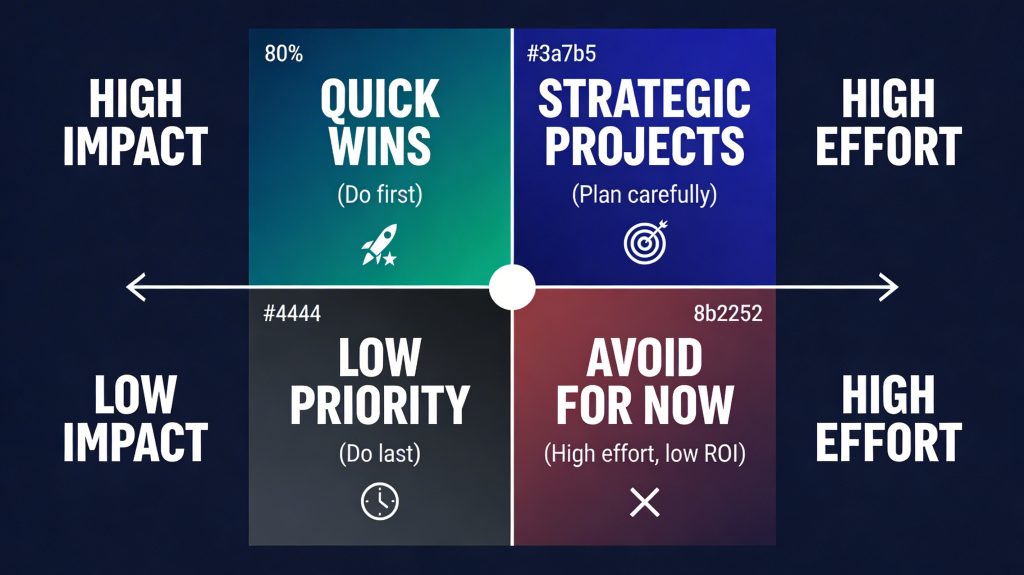
Start in the top-left quadrant: high impact, low effort. These are your Quick Wins — the use cases that will deliver measurable results within weeks, build internal confidence in AI, and create the momentum for Phase 3 scaling.
4.3 The three universal quick wins
Across virtually every business in every industry, three AI use cases consistently score as Quick Wins in the impact-effort matrix:
Quick Win 1: AI-assisted email and communication drafting
Tool: Claude or ChatGPT with a well-designed prompt template.
Setup time: 2 hours to create templates and train your team.
Expected result: 60–90 minutes saved per person per day on communication tasks.
Difficulty: Zero — no integration required, works immediately.
Quick Win 2: AI-generated meeting summaries and action items
Tool: Otter.ai, Fireflies.ai, or Microsoft Copilot (for Microsoft 365 users).
Setup time: 30 minutes.
Expected result: Elimination of post-meeting documentation time (typically 30–60 minutes per meeting), plus significantly higher action item completion rates due to automatic distribution.
Difficulty: Very low — plug-in tools that connect to your calendar and video conferencing.
Quick Win 3: AI customer FAQ responder
Tool: Claude API, ChatGPT API, or no-code tools like Tidio or Intercom AI.
Setup time: 4–8 hours to configure and test.
Expected result: 40–60% reduction in first-response customer service volume handled by humans, 24/7 availability, consistent response quality.
Difficulty: Low — no-code tools make this accessible without technical expertise.
These three use cases alone, implemented well, typically deliver 15–20 hours of recovered time per employee per week in businesses where they are most applicable. At a fully-loaded employee cost of $50–100/hour, the ROI is immediate and substantial.
5. Phase 2: Pilot — Running Your First AI Project the Right Way
5.1 The pilot principles
A pilot is not an experiment you run to decide whether AI works. It is a structured deployment you run to measure exactly how well AI works for a specific use case in your specific business context — and to generate the evidence base for Phase 3 scaling.
The difference matters: experiments are open-ended. Pilots have defined success criteria, defined timelines, and defined measurement frameworks agreed before the pilot begins.
The four pilot principles:
Principle 1: One use case at a time
Resist the temptation to pilot three use cases simultaneously. Concurrent pilots dilute your attention, confuse your measurement, and increase your chances of abandoning all three when one hits friction. Run one. Finish it. Then start the next.
Principle 2: Define success before you start
Before your pilot begins, write down: “This pilot will be considered successful if [specific metric] improves by [specific amount] within [specific timeframe].” Examples:
- “Time to draft a client proposal decreases from 2 hours to 30 minutes within 4 weeks”
- “First-response customer service tickets resolved without human involvement increases from 0% to 45% within 6 weeks”
- “Weekly report generation time decreases from 4 hours to 30 minutes within 3 weeks”
Principle 3: Measure the baseline first
Before turning on any AI tool, measure the current state of the workflow you are improving. Record the time taken, the error rate, the volume handled, the cost. You cannot demonstrate ROI without a baseline.
Principle 4: Include your team
The single most common reason AI pilots fail is not technical failure — it is human resistance. People who were not consulted about the AI tool, who were not trained on how to use it effectively, and who feel threatened by it will find ways to avoid using it or to undermine its results. Involve your team in the pilot design. Explain the purpose: to make their work easier and higher-value, not to replace them.
5.2 The 6-week pilot structure
Week 1: Foundation
- Select your pilot use case (from your Quick Wins list)
- Choose and set up your AI tool
- Measure your baseline metrics
- Brief your team — explain the purpose, the timeline, and how success will be measured
- Run a 2-hour team training session on the AI tool
Week 2: Guided adoption
- Everyone on the pilot team uses the AI tool for the target workflow every day
- Daily check-ins to address friction points, prompt quality issues, and adoption barriers
- Collect first impressions and early time data
Weeks 3–4: Independent operation
- Remove the daily check-ins — team runs the workflow with AI independently
- Weekly measurement of your target metrics
- Identify outliers: the people using AI most effectively (your internal champions) and those still struggling (who need additional support)
Weeks 5–6: Measurement and analysis
- Final metrics collection
- Compare against baseline
- Interview team members about their experience
- Document the results in a one-page business case for Phase 3 scaling
5.3 What to do when the pilot doesn’t go as planned
Not every pilot hits its targets immediately. The most common failure modes and how to address them:
“The AI outputs aren’t good enough”
Almost always a prompt quality issue, not a model capability issue. The model is only as good as the context and instructions it receives. Invest 4 hours in prompt engineering — rewriting your instructions with more specific context, clearer output requirements, and relevant examples. In 90% of cases, output quality improves dramatically.
“My team isn’t using it”
Investigate the root cause. Is it a training issue (they don’t know how), a workflow issue (the tool isn’t integrated into their actual process), or a resistance issue (they don’t want to change)? Each requires a different response. Training issues are quick to fix. Workflow integration requires setup time. Resistance requires conversations about the purpose and a demonstration of personal benefit.
“It’s not saving as much time as expected”
Usually means the workflow has more steps than anticipated, or the AI output requires more editing than expected. Break the workflow down further. Identify the specific sub-step where time is being lost. Redesign the AI integration to address that sub-step specifically.
6. Phase 3: Scale — Expanding What Works Across Your Organisation
6.1 From pilot to playbook
When a pilot succeeds, it produces two things: results and knowledge. The results justify further investment. The knowledge — about what works, what doesn’t, how to prompt effectively, how to train new users, what integrations are required — is what enables scaling.
The first output of Phase 3 is converting the pilot’s knowledge into a playbook: a documented, repeatable process that any team member can follow to implement the AI use case in their workflow without requiring the same trial-and-error the pilot team went through.
A playbook has four components:
- The tool setup guide: Step-by-step instructions for configuring the AI tool for this use case, including login, settings, integrations, and initial data setup
- The prompt library: The specific prompts and templates that produced the best results during the pilot, with guidance on when to use each and how to customise them
- The workflow guide: A step-by-step description of the new AI-augmented workflow — what the human does, what the AI does, and how they interact
- The quality checklist: The specific things to check in every AI output before using it — the errors, biases, and omissions that the AI most commonly produces in this use case
6.2 The scaling sequence
Scaling AI across your organisation should follow a deliberate sequence — not a simultaneous rollout. The sequence that consistently works:
Step 1: Identify your internal champions
In every pilot, a subset of participants becomes enthusiastic, expert users. These are your internal champions — the people who will train others, answer questions, and make the case for AI to their sceptical colleagues. Identify them. Give them time and recognition to do this work.
Step 2: Expand within the same function first
Before scaling to a new department, expand the successful use case to all relevant users within the same function. If your customer service team ran the pilot, deploy to all customer service team members before moving to sales or marketing. This builds depth of expertise within one function before the breadth expansion begins.
Step 3: Expand to adjacent functions
The next wave of scaling targets the functions most similar to your pilot function — similar workflows, similar data requirements, similar team culture. This is where your playbook pays off: adjacent function deployment is faster and smoother because the foundational work is done.
Step 4: Add a second use case
While your first use case is scaling to adjacent functions, launch a second pilot in a new use case category — often one from the Strategic Projects quadrant of your impact-effort matrix. You now have the experience to run pilots faster and more effectively. The second pilot typically takes half the time of the first.
6.3 What AI delivers at scale: the ROI data
The productivity and cost reduction data from AI deployments at scale — now available from hundreds of documented enterprise deployments — consistently shows the following impact ranges by business function:
[EMBED CHART: ai_roi_by_function.png]
| Business Function | Cost Reduction / Efficiency Gain | Primary Driver |
|---|---|---|
| Customer service | 30–50% | First-response automation, 24/7 availability |
| Operations & back office | 30–45% | Document processing, data entry, reporting |
| Sales & marketing | 25–40% | Content generation, lead qualification, personalisation |
| Finance & reporting | 20–35% | Automated report generation, cash flow forecasting |
| IT & development | 25–40% | AI coding assistance, bug detection, documentation |
| HR & recruitment | 20–30% | Job description creation, CV screening, onboarding |
Sources: Rootstack 2026, Goldman Sachs 2026, Bank of America deployment data, Kersai client analysis
These are ranges, not guarantees. The businesses at the high end of these ranges have invested seriously in prompt quality, team training, and workflow integration. The businesses at the low end are using AI as a glorified search engine without integrating it into their actual processes.
7. Phase 4: Optimise — Compound Your Gains
7.1 The compounding principle
AI’s most powerful economic characteristic is that its gains compound. Every improvement to your prompts, context, workflows, and integrations builds on the previous improvement — unlike human productivity improvements, which tend to plateau.
At Phase 4, your organisation is no longer asking “how do we deploy AI?” It is asking “how do we make our AI deployments 10× better?” — and the answers to that question produce gains that are qualitatively different from the initial efficiency improvements of Phase 2 and 3.
The three levers that compound AI gains in Phase 4:
7.2 Lever 1: Context engineering
The single most impactful Phase 4 improvement is investing in context quality — the information and instructions you provide to your AI tools.
Context engineering is the practice of systematically designing, structuring, and maintaining the information that AI tools receive before executing a task. It is the difference between asking a new employee to do a task with no briefing versus providing them with your company background, your brand guidelines, your customer profiles, your workflow preferences, and the specific requirements for this task.
The practical output of context engineering: AI systems that behave like a senior employee who has worked in your business for three years — rather than a capable stranger who has never heard of your company.
To build context engineering into your AI workflows:
- Create a company context document: your business description, industry, target customers, brand voice, key products/services, and most common workflows — added to the beginning of every AI prompt session
- Build customer persona profiles: detailed descriptions of your key customer types, their pain points, their language, their decision criteria — used by your marketing and sales AI
- Develop standard operating procedure summaries: concise descriptions of your key business processes — used by your operations AI
- Maintain a prompt library: your best-performing prompts for every use case, updated as you find improvements
7.3 Lever 2: Integration and automation
Phase 4 AI moves from assisted (AI helps a human do a task) to integrated (AI is embedded in the workflow and operates with minimal human initiation). This is the transition from AI as a tool you use to AI as infrastructure your business runs on.
The technology that enables this transition: Model Context Protocol (MCP) — an open standard that connects AI models to your existing business tools and data sources, allowing AI to read from and write to your CRM, your project management system, your email, your calendar, your accounting software, and your databases.
With MCP-enabled integrations, an AI system can:
- Automatically draft a follow-up email after a CRM entry is updated
- Generate a weekly performance report by pulling data directly from your analytics and accounting systems
- Create a project update in your project management tool based on meeting notes it transcribed
- Flag a customer account for review when its payment pattern deviates from its historical norm
These are not theoretical capabilities. They are available today, using existing tools, at costs accessible to every business. The implementation requires a day of setup, not a year of development.
7.4 Lever 3: Agent deployment
The most powerful Phase 4 capability: AI agents — AI systems that can execute multi-step tasks independently, making decisions at each step without requiring human input for every action.
An AI agent is not a chatbot that answers questions. It is an AI system that receives an objective and works through the steps required to achieve it — searching the web, reading documents, writing outputs, sending communications, and updating systems along the way.
Example: A sales AI agent receives the objective “follow up with all leads from last month’s trade show who haven’t responded to the first email.” It accesses your CRM, identifies the relevant contacts, reviews each contact’s profile and interaction history, drafts a personalised follow-up email for each one, schedules them for sending at the optimal time for each contact’s time zone, and updates the CRM records — all without human involvement after the initial objective is set.
This is not a future capability. It is available today through tools including Claude, GPT-5.4, and AI agent frameworks including n8n, Make (formerly Integromat), and Zapier AI. A basic sales follow-up agent can be built by a non-technical business owner in 4–6 hours.
8. Phase 5: Transform — Becoming an AI-Native Business
8.1 What AI-native means
Phase 5 is not a destination you reach — it is a way of operating that continuously evolves. An AI-native business is one where AI is not a layer added on top of existing processes but is embedded in the foundational design of how the business operates.
The practical difference: a Phase 3 business uses AI to do its existing processes faster and cheaper. A Phase 5 business has redesigned its processes around AI’s capabilities — doing things that were not possible at all without AI, at scales and costs that were not achievable before.
Examples of Phase 5 thinking:
- A marketing agency that uses AI to produce 10× the volume of personalised content for clients at the same headcount — not by making existing staff faster, but by redesigning the production model around AI execution with human direction
- A legal firm that uses AI to offer fixed-price contract review services that were previously uneconomical — not by making lawyers faster, but by changing the service model so AI handles the review and lawyers handle the exceptions
- A financial services business that uses AI to monitor every client account continuously — not by hiring more analysts, but by deploying AI agents that surface issues the moment they occur rather than in the next quarterly review
Phase 5 thinking is not available to every business today — it requires the context infrastructure, integration depth, and AI literacy that come from progressing through Phases 1–4. But it is the destination that makes every investment in the earlier phases worthwhile. This is where AI stops being a cost-reduction tool and becomes a revenue-generation and competitive-differentiation engine.
8.2 The three Phase 5 business models emerging in 2026
Three new business model patterns are emerging at Phase 5 that are worth understanding as strategic destinations:
The AI-Leveraged Service Business: A service business (consulting, legal, accounting, design, marketing) that uses AI to serve 3–5× as many clients per employee as competitors, without sacrificing quality — enabling either significantly lower pricing or significantly higher margins. The AI handles the repetitive execution; the humans handle the strategy, relationships, and quality assurance.
The Personalisation Business: A product or service business that uses AI to deliver experiences so personalised at scale that they function as a genuine competitive moat. AI enables one-to-one personalisation across customer bases of thousands or millions — impossible at human scale but straightforward at AI scale.
The Continuous Insight Business: A business that converts its operational data — customer interactions, transaction patterns, operational metrics — into continuously updated intelligence that informs real-time decisions across the organisation, using AI to extract signals that human analysis would miss or identify too late.
9. The AI Tools Every Business Should Know in 2026
The AI tool landscape is enormous — hundreds of products across dozens of categories. This section cuts through the noise with the specific tools that deliver the best results for most business use cases in 2026, organised by function.
[EMBED CHART: smb_ai_adoption.png]
9.1 The foundation: AI assistants
These are your primary AI thinking and writing partners — the tools you use for drafting, analysis, research, and reasoning.
| Tool | Best For | Pricing | Why It Stands Out |
|---|---|---|---|
| Claude (Anthropic) | Enterprise tasks, coding, long documents | From $22/month | Best reasoning, 200k context window, safest for business use |
| ChatGPT (OpenAI) | General use, consumer-facing tasks | From $20/month | Best brand recognition, huge plugin ecosystem |
| Gemini (Google) | Research, Google Workspace integration | Free–$20/month | Best for businesses using Google Workspace |
| Copilot (Microsoft) | Microsoft 365 users | $30/month per user | Deep Office integration — best for Word/Excel/Teams users |
Our recommendation for most businesses: Start with Claude for your primary business AI assistant. Its 200,000-token context window and superior performance on complex business tasks — document analysis, contract review, strategy synthesis — consistently delivers better results than alternatives for the use cases that matter most in a business context.
9.2 Meeting intelligence
| Tool | Function | Pricing |
|---|---|---|
| Otter.ai | Transcription, summaries, action items | Free–$20/month |
| Fireflies.ai | Meeting notes, CRM integration | Free–$19/month |
| Microsoft Copilot | Teams integration — transcription + action items | Included in M365 Copilot |
| Zoom AI Companion | Zoom-native meeting summaries | Included in Zoom One |
9.3 Customer service AI
| Tool | Function | Pricing |
|---|---|---|
| Intercom Fin | AI customer support — resolves tier-1 tickets | From $39/month + usage |
| Tidio | Website chat + AI FAQ responder | From $0 (free tier available) |
| Zendesk AI | Enterprise support automation | From $55/agent/month |
| HubSpot AI | CRM-integrated customer communication | Included in HubSpot tiers |
9.4 Content and marketing AI
| Tool | Function | Pricing |
|---|---|---|
| Jasper | Marketing copy, campaigns, brand voice | From $49/month |
| Copy.ai | Sales copy, email sequences, proposals | Free–$49/month |
| Canva AI | Design + AI image generation | Free–$16.99/month |
| Descript | AI video editing, transcription, cloning | From $24/month |
9.5 Automation and workflow AI
| Tool | Function | Pricing |
|---|---|---|
| Zapier AI | Connect apps + AI-powered automations | From $29.99/month |
| Make (Integromat) | Advanced workflow automation with AI | From $9/month |
| n8n | Open-source AI agent builder | Free (self-hosted) or from $20/month |
| Notion AI | Knowledge management + AI writing | $10/month per user add-on |
9.6 The AI tool decision framework
With hundreds of options available, choosing tools can itself become a distraction. Apply this decision filter before subscribing to any AI tool:
- Does it solve a problem on my priority list? If not, it’s noise — regardless of how impressive it is.
- Can I trial it for free or at low cost? Most AI tools have free tiers. Never pay before testing.
- How long will it take my team to become effective with it? If the learning curve is more than 4 hours, ensure the expected ROI justifies the training investment.
- Does it integrate with the tools we already use? Integration multiplies value. A tool that works in isolation delivers a fraction of the value of one connected to your existing systems.
- What happens to our data? Always check the privacy policy. Confirm that your business data is not being used to train the provider’s models without your consent.
10. How to Choose: Buy, Build, or Partner?
Every AI implementation decision involves a fundamental choice: do you buy an off-the-shelf solution, build a custom solution, or partner with an AI consultancy to design and implement something in between?
The honest answer: most small and medium businesses should buy, not build — at least for their first 12–18 months of AI adoption. Here is why:
The case for buying (off-the-shelf AI tools)
- Immediate availability — deploy today, not in six months
- Proven functionality — someone else has already solved the technical problems
- Continuous improvement — the vendor updates the product as AI capabilities advance
- Predictable cost — monthly subscription rather than development project uncertainty
- No technical risk — if it doesn’t work, you cancel and try something else
The case for building (custom AI development)
- Your use case is genuinely unique and no off-the-shelf solution addresses it
- You have a competitive advantage that depends on AI capabilities your competitors cannot replicate by buying the same tool
- You have the technical team (or budget to hire one) to build and maintain it
- The scale of the use case justifies the development investment — typically $100,000+ in annual productivity gain before custom development makes economic sense
The case for partnering (AI consultancy)
- You have the strategic ambition for significant AI transformation but not the in-house technical capability
- You want to accelerate your path through the phases without the trial-and-error cost
- You need help identifying which use cases will generate the highest ROI for your specific business
- You want accountability — someone whose job is to ensure your AI investments deliver results
The right answer depends on your business’s technical capability, budget, and strategic ambition. The framework above helps you identify which approach is appropriate for each use case — most businesses end up with a mix: bought tools for standard use cases, custom development for genuinely unique competitive applications, and partnership support for the strategy and integration layer.
11. Your 90-Day AI Action Plan
This is the section most guides skip: the specific, week-by-week actions that translate the framework into execution. What follows is a concrete 90-day plan applicable to most businesses — adjust the specific tools and use cases based on your pain point audit results.
[EMBED CHART: ai_growth_correlation.png]
Days 1–7: Foundation
Day 1: Run the pain point audit with your leadership team (2-hour session). Collect responses from all team leaders.
Day 2: Compile and score all pain points using the impact-effort matrix. Identify your top 3 Quick Wins.
Day 3: Research the AI tools most relevant to your top Quick Win. Sign up for free trials of 2–3 options.
Day 4–5: Evaluate the free trials against your specific use case. Make a tool selection decision.
Day 6: Set up your chosen tool. Configure it with your company context information.
Day 7: Document your baseline metrics for the pilot use case. Set your pilot success criteria.
Days 8–30: First Pilot
Week 2: Train your pilot team (2-hour session). Begin using the AI tool for the target workflow every day. Daily 15-minute check-ins to address friction.
Week 3: Independent operation — team runs the workflow with AI without daily check-ins. Weekly metrics collection.
Week 4: Final week of pilot. Collect measurements. Interview team members. Compare against baseline. Write your one-page pilot results document.
Days 31–60: Expand and Add
Week 5: Based on pilot results, expand the successful use case to all relevant users in the same function. Build your playbook.
Week 6: Begin your second pilot in a new use case category. Apply everything you learned from the first pilot.
Week 7: Continue expanding use case 1. Midpoint review of use case 2 pilot.
Week 8: Complete use case 2 pilot. Begin planning use case 3.
Days 61–90: Scale and Systematise
Week 9: Begin rolling out use case 2 to all relevant users. Begin use case 3 pilot.
Week 10: Explore integration opportunities — connect your AI tools to your existing business systems using Zapier, Make, or native integrations.
Week 11: Build your context engineering foundations — company context document, customer personas, prompt library.
Week 12: Review your 90-day results across all active use cases. Calculate cumulative ROI. Present to your leadership team. Set your 90-day Phase 3 scaling plan.
12. How Much Does AI Implementation Cost?
[EMBED CHART: ai_cost_collapse.png]
This is the question every business owner wants answered honestly — and the honest answer is: far less than you expect.
AI implementation costs have fallen 97% in four years. What cost enterprise budgets in 2022 is accessible on a small business budget in 2026.
Scenario 1: The Minimal Start (Solo business owner or very small team)
- Claude Pro or ChatGPT Plus: $20–22/month
- Meeting AI (Otter.ai free tier): $0
- Automation (Zapier free tier): $0
- Total: $20–22/month
- Expected value: 5–10 hours saved per week. At $50/hour value, that’s $1,000–2,000/month in recovered time.
- ROI: 45–90× monthly investment
Scenario 2: The Growing Business (5–20 employees)
- Claude Team or ChatGPT Team: $25–30/user/month × 10 users = $250–300/month
- Meeting AI (Fireflies Pro): $19/month × 5 meeting-heavy users = $95/month
- Customer Service AI (Tidio Growth): $79/month
- Automation (Zapier Professional): $74/month
- Total: ~$500–550/month
- Expected value: 8–12 hours saved per employee per week across the team. At $50/hour average, that’s $16,000–24,000/month in recovered time.
- ROI: 30–45× monthly investment
Scenario 3: The Serious Investment (20–100 employees with custom integration)
- Enterprise AI licences (Claude/ChatGPT Enterprise): $30–60/user/month × 50 users = $1,500–3,000/month
- Meeting AI (enterprise tier): $200–400/month
- Customer Service AI (Intercom/Zendesk AI): $500–1,500/month
- Automation platform (Make Business): $300–500/month
- AI consultancy for strategy and integration (one-time): $5,000–20,000
- Total ongoing: $2,500–5,400/month + one-time setup
- Expected value: Significant process transformation across multiple functions. ROI typically measured in hundreds of thousands to millions annually.
- ROI: Highly variable but consistently positive for well-executed implementations
The bottom line on cost: For most small and medium businesses, the AI tools that will transform your operations cost less per month than a single paid day of employee time. The constraint is never cost. It is strategy, prioritisation, and execution.
13. AI Governance: What Every Business Must Get Right
Governance is the unsexy part of AI adoption that most guides skip. It is also one of the most important — because the reputational, legal, and operational risks of ungoverned AI are real, and the governance required to avoid them is genuinely simple.
13.1 The five governance essentials
1. Define what AI can and cannot do independently
Create a simple policy that specifies which decisions AI can make autonomously (drafting emails, generating reports, creating first drafts) versus which decisions always require human review and approval before action (customer commitments, financial decisions, compliance-related communications, anything that creates legal obligations).
2. Establish output verification standards
For every AI use case, define the specific quality checks that must be applied to AI outputs before they are used. For customer communications: check for accuracy, tone, and completeness. For financial reports: verify calculations and source data. For legal documents: always have a qualified human review before sending. These checks take seconds when embedded in workflow habits.
3. Maintain a human accountability layer
For every AI-assisted decision or output, there is a named human accountable for its accuracy and appropriateness. AI does not make decisions — it supports human decision-making. The human who reviewed and approved the output is responsible for it.
4. Protect your data
Before connecting any AI tool to your business data, confirm: (a) the tool’s data handling policies — is your data stored, and if so, where and for how long? (b) whether your data is used to train the provider’s models — most enterprise tools offer data processing agreements that exclude training; ensure you have one. (c) whether there are confidentiality obligations in your business that restrict what data can be shared with third-party AI tools.
5. Train your team on AI ethics and limitations
Every employee using AI tools should understand three things: AI can be confidently wrong (always verify facts and figures); AI outputs reflect the biases in their training data (apply human judgment to anything that touches sensitive topics); and AI is a tool that augments human judgment, not a replacement for it.
13.2 The Australian regulatory context
Australian businesses have specific legal obligations relevant to AI use that are not always covered in generic AI guides:
Privacy Act 1988: The Privacy Act applies to AI systems that process personal information about Australian residents. If your AI tools process customer data — names, emails, purchase histories, health information — you must ensure your privacy policy discloses this, that you have a legal basis for processing under the Australian Privacy Principles, and that you have contracts with AI providers that ensure their handling of your customer data complies with Australian law.
Consumer Law (ACL): The Australian Consumer Law prohibits misleading and deceptive conduct. If AI-generated content makes claims about your products or services that are inaccurate, the business — not the AI — is legally responsible under the ACL.
NSW Digital Work Systems Act (DWSA) 2026: For businesses operating in New South Wales, the DWSA (covered in detail in our March 19 article) requires businesses above certain thresholds to conduct formal risk assessments of AI systems that make or significantly influence decisions affecting workers, consult with affected workers before deploying such systems, and maintain records of AI decision systems. This law represents the emerging direction of AI workplace regulation across Australia — even businesses not currently in scope should understand its principles as a governance framework.
14. FAQ
How do I build an AI strategy for my business?
Building an AI strategy for your business involves five steps: (1) Conduct a pain point audit to identify where AI can create the most value in your specific operations. (2) Score your identified use cases on an impact-effort matrix to prioritise Quick Wins. (3) Run a structured 6-week pilot on your highest-priority use case with defined success criteria and baseline metrics. (4) Use your pilot results to build a playbook and scale proven use cases across your organisation. (5) Invest in context engineering, tool integration, and AI agent deployment to compound your gains over time. The most important rule: start with your business problems, not with AI tools.
Do I need a technical background to implement AI in my business?
No. The majority of high-value AI tools for business in 2026 are designed for non-technical users — they require no coding, no data science expertise, and no IT infrastructure beyond a standard business internet connection. Tools like Claude, ChatGPT, Otter.ai, Fireflies, Tidio, and Zapier AI are all configurable through visual interfaces and plain-English instructions. The skill that matters most is not technical — it is the ability to clearly define your business problem and write clear instructions for what you want AI to produce.
What is the ROI of AI for small business?
According to Salesforce’s 2026 SMB survey, 91% of small businesses using AI report revenue increases and 86% report improved margins. The US Chamber of Commerce data shows small business AI adoption jumped from 40% to 58% in one year. Specific ROI ranges by function: customer service (30–50% cost reduction), operations (30–45%), sales and marketing (25–40%), finance reporting (20–35%). For a growing business spending $500/month on AI tools, recovering 8–12 hours per employee per week across a 10-person team at $50/hour fully-loaded cost delivers $16,000–24,000/month in value — a 30–45× return on the tool investment.
How long does it take to implement AI in a business?
The first AI use case — from initial planning to a running pilot with measurable results — typically takes 4–6 weeks for a well-run implementation. Expanding to three to five use cases across your organisation takes 3–6 months. Reaching Phase 3 maturity (multiple AI-augmented functions delivering measurable ROI across the organisation) takes 6–12 months. The most common mistake is expecting immediate transformation — AI implementation, like all organisational change, requires time for adoption, learning, and workflow adaptation. The businesses achieving the best results are those that started 6–12 months ago and are now reaping compounding gains.
What AI tools should a small business use in 2026?
The four tools that deliver the best results for most small businesses in 2026 are: (1) Claude (Anthropic) — for primary AI assistance, document analysis, writing, and research ($22/month); (2) Otter.ai or Fireflies — for meeting transcription and action item generation (free to $20/month); (3) Tidio — for AI customer service and FAQ automation (free tier available); and (4) Zapier AI or Make — for connecting your AI tools to your existing business systems and automating repetitive workflows ($0–$30/month). These four tools together cost less than $75/month and can save 10–20 hours per week for a typical small business team.
What is the difference between AI augmentation and AI automation?
AI augmentation means AI helps humans do their existing jobs more effectively — producing first drafts they then edit, synthesising research they then interpret, generating reports they then review. AI automation means AI performs tasks independently without requiring human involvement for each execution. In 2026, 78% of AI usage is augmentation and 22% is automation, according to Anthropic’s Economic Index. Augmentation is the appropriate starting point for most businesses — it delivers immediate productivity gains with low risk, builds AI literacy across your team, and creates the foundation for selective, well-governed automation of appropriate tasks over time.
How do I choose between Claude and ChatGPT for my business?
Choose Claude if your primary use cases involve: long documents (contracts, reports, research — Claude’s 200k-token context window is unmatched), complex business reasoning, coding tasks, or enterprise compliance (Claude’s Constitutional AI safety approach is rated highest by enterprise compliance teams). Claude now captures 73% of new enterprise AI spending, reflecting this preference in real business decisions. Choose ChatGPT if your primary use cases involve: consumer-facing interactions where ChatGPT’s brand recognition matters, computer use and browser automation (OpenAI’s Operator is more mature), or creative and image generation tasks (GPT-5.4’s multimodal capabilities are strong). For most business owners, the practical answer is: trial both for your specific use case and choose based on actual output quality — not benchmarks.
Is AI going to replace my employees?
The current evidence — including Anthropic’s March 2026 Economic Index covering real-world AI usage data — shows that 78% of AI usage is augmentation (AI helping employees work more effectively) rather than automation (AI replacing employees). The businesses achieving the best results from AI are deploying it to make their people more productive and capable, not to eliminate roles. That said, the automation proportion is growing each quarter — and some specific roles characterised by high volumes of repetitive, rule-based tasks (basic data entry, standard template drafting, FAQ-level customer service) are at genuine risk of being substantially automated over the next 3–5 years. The best approach for business owners is transparency with your team, proactive retraining for AI collaboration skills, and designing AI deployments that move your people toward higher-value work rather than out of work.
Ready to Build Your AI Strategy?
The businesses that are pulling ahead in 2026 are not the ones with the biggest AI budgets. They are the ones that made a decision, built a plan, and started executing — even imperfectly.
If you have read this guide, you have the framework. The question is execution.
Kersai works with businesses across Australia and globally to accelerate their journey through the AI maturity model — from identifying your highest-value use cases, to designing and implementing your pilot programmes, to building the context infrastructure and integrations that compound your gains over time.
If you would like to discuss building your AI strategy with the Kersai team, visit kersai.com or reach out directly. We work with businesses at every stage of the AI maturity model — from first pilot to full organisational transformation.
This article was researched and written by the Kersai Research Team. Kersai is a global AI consultancy firm dedicated to helping enterprises confidently navigate the rapidly evolving artificial intelligence landscape — from cutting-edge strategic insights to practical, large-scale AI implementation. To learn more, visit https://kersai.com.